The Platform Engineering Roadmap (Azure, 2027)
If you're a DevOps engineer, a QA engineer or a network engineer and you want to move into platform engineering, you don't need another list of tools. You need one project: a path to production that other engineers can use without asking you.
This roadmap is that project, built on Azure in six steps. Each step adds to the same thing, and you start at a different step depending on the job you have now. Every step comes with what "done" looks like, the commands to get there, and the labs to practise it.
It also corrects something. Two services that most platform engineering roadmaps still recommend are retiring or already gone. The "Tools That Changed" section covers what to use instead.
What a Platform Team Builds
Microsoft's platform engineering guidance describes the goal in one phrase: self-service with guardrails. Developers get a path to production they can use on their own, and the security, cost and compliance rules are built into that path, so nobody opens a ticket to get an environment.
Think of it as a paved road. You can still drive off-road, but most people take the road, because it's faster and someone keeps it maintained.
Three ideas shape everything below:
| Idea | What it means for your project |
|---|---|
| Start with the thinnest viable platform | Microsoft recommends a minimum viable platform that you grow over time, not a big-bang build. Your project starts with one app and one path. |
| Treat developers as customers | A platform is a product. If developers don't want to use it, it has failed, however good the tooling is. |
| A bad platform slows everyone down | The 2024 DORA report found an 8% drop in throughput for teams using an internal developer platform compared with teams that didn't, particularly where the platform was mandated for the whole lifecycle. That's why step 6 measures whether yours actually helps. |
The CNCF platforms white paper lists the capabilities a platform can offer, from templates and environments to observability and secrets. Don't try to build all of them. Build the ones your developers ask for.
Start Here by Role
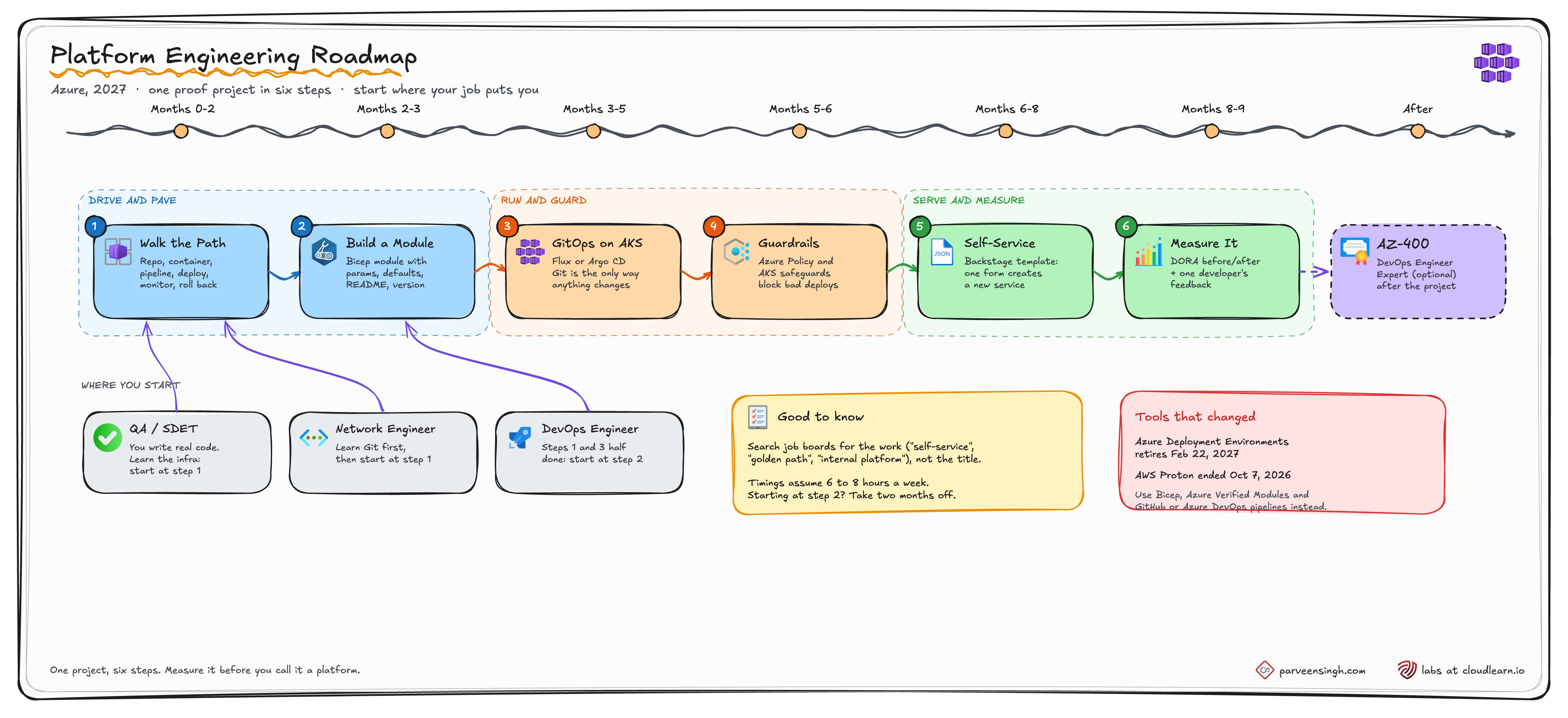
Click the roadmap to zoom in.
Find your row first:
| Starting job | What you already have | The gap | Start at | Where you fit on a platform team |
|---|---|---|---|---|
| DevOps engineer | Pipelines, containers, some Kubernetes and infrastructure as code | Thinking about the person who uses your module or pipeline | Step 2 (step 1 and half of step 3 are already done) | Golden paths, CI/CD templates, GitOps |
| QA engineer or SDET | Real code: test frameworks with design, CI and maintenance behind them | Infrastructure: Azure, containers and networking | Step 1 | Conformance: testing templates, policies and the platform itself |
| Network engineer | DNS, routing, firewalls and private connectivity | Git, code review and working in pull requests | Git first, then step 1 | Cluster networking: Azure CNI, Gateway API, private clusters and egress |
One more thing about job titles. Cloud, DevOps and platform roles get used interchangeably, so search job boards for the work, such as "self-service", "golden path" or "internal developer platform", not just the title.
The timings below assume 6 to 8 hours a week next to a full-time job. If you start at step 2, take the months for step 1 off the total.
The Six Steps
Each step adds to the same project. By step 6 you have a working platform for one app, and the evidence that it helps.
| Step | What you build | Proof artifact | Source | CloudLearn lab |
|---|---|---|---|---|
| 1. Walk the path (months 0 to 2) | One app: repo, container, pipeline, deploy, monitoring, rollback | A green pipeline run and a rollback you've actually done | Microsoft: self-service with guardrails | Container Apps · GitHub Actions |
| 2. Build a module (months 2 to 3) | Your infrastructure as a reusable Bicep module | A published module with parameters, defaults and a README | Azure Verified Modules | Bicep modules in ACR |
| 3. GitOps on AKS (months 3 to 5) | The cluster driven from Git with Flux or Argo CD | A change merged in Git that the cluster applies on its own | GitOps for AKS | First pod with kubectl · First Helm chart |
| 4. Guardrails as code (months 5 to 6) | Azure Policy and AKS deployment safeguards | A bad deployment blocked by policy, with the error | AKS deployment safeguards | |
| 5. Self-service (months 6 to 8) | A Backstage Software Template that creates a repo and calls your module | A new service created from one form | Backstage Software Templates | |
| 6. Measure it (months 8 to 9) | DORA metrics before and after, plus feedback from one developer | A before-and-after table and a written list of what to fix | DORA metrics |
Steps 4, 5 and 6 don't have a CloudLearn lab yet. The Microsoft and Backstage docs linked above cover them.
Steps 1 and 2: Drive the Road, Then Pave It
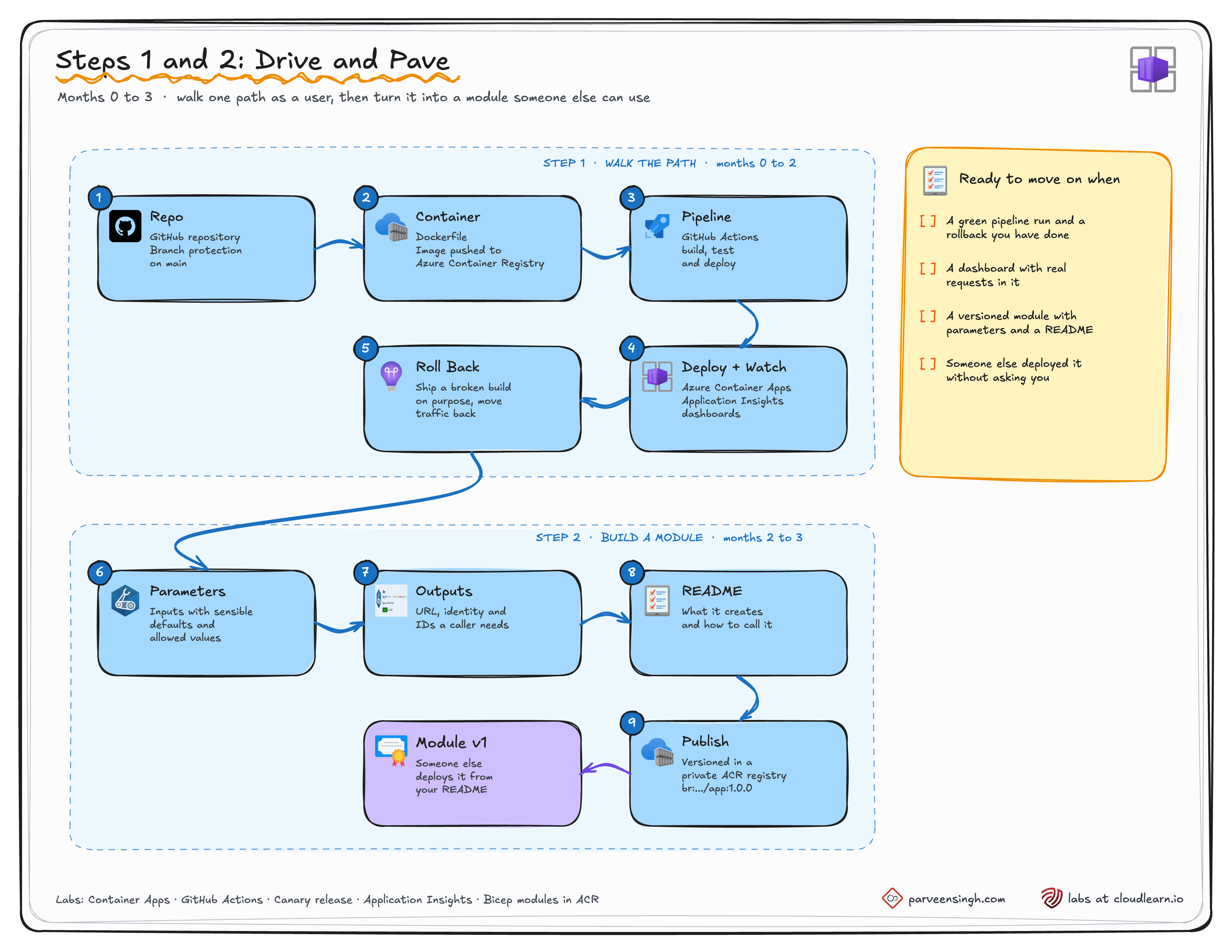
Step 1: Walk the path end to end (months 0 to 2)
You can't pave a road you've never driven. Take one small app and walk it all the way to production yourself:
- Put the app in a GitHub repository with branch protection on
main. - Containerize it and push the image to Azure Container Registry.
- Build and deploy it with GitHub Actions to Azure Container Apps.
- Add monitoring with Application Insights.
- Deploy a broken version on purpose, then roll back.
Done looks like: a green pipeline run, a dashboard with real requests, and a rollback you can describe step by step. In Container Apps with multiple-revision mode on, a rollback means moving traffic back to the previous revision:
az containerapp ingress traffic set \
  --name app-paved-road \
  --resource-group rg-platform-proof \
  --revision-weight app-paved-road--v1=100 app-paved-road--v2=0
If Git or GitHub Actions are new to you, read Git vs GitHub vs GitHub Actions first, and the Bicep series covers the infrastructure side.
Labs:
| Lab | Covers |
|---|---|
| Containerize and Deploy a Web Application to Azure Container Apps | Container and deploy |
| Deploying Containerized Applications to Azure with GitHub Actions | The pipeline |
| Implement a Canary Release for Azure Container Apps | Revisions, traffic and rollback |
| Getting Started with Azure Application Insights | Monitoring |
Step 2: Turn your infrastructure into a module (months 2 to 3)
This is the step where you stop building for yourself and start building for someone else. Take the infrastructure from step 1 and turn it into a Bicep module another team could use without reading your code:
- Inputs as parameters, with sensible defaults and allowed values.
- Outputs for everything a caller needs, such as the app URL and identity.
- A README that explains what it creates and how to call it.
- A version number, published to a private registry in Azure Container Registry.
Azure Verified Modules is the model to copy. Read one of its modules before you write yours.
# Publish version 1.0.0 of the module to your registry
az bicep publish \
  --file modules/container-app/main.bicep \
  --target br:crplatformproof.azurecr.io/bicep/modules/container-app:1.0.0
// Any team can now call it by version, without copying your code
module app 'br:crplatformproof.azurecr.io/bicep/modules/container-app:1.0.0' = {
  name: 'orders-api'
  params: {
    appName: 'orders-api'
    image: 'crplatformproof.azurecr.io/orders-api:1.4.2'
  }
}
Done looks like: someone who isn't you deploys the app using only your README. For more on private registries, see Bicep modules and private registries.
Labs:
| Lab | Covers |
|---|---|
| Publish and Consume Bicep Modules with Azure Container Registry | Publishing and calling a module |
| Automate Bicep Deployments with GitHub Actions | Deploying the module from a pipeline |
Steps 3 and 4: Run It From Git, Then Guard It
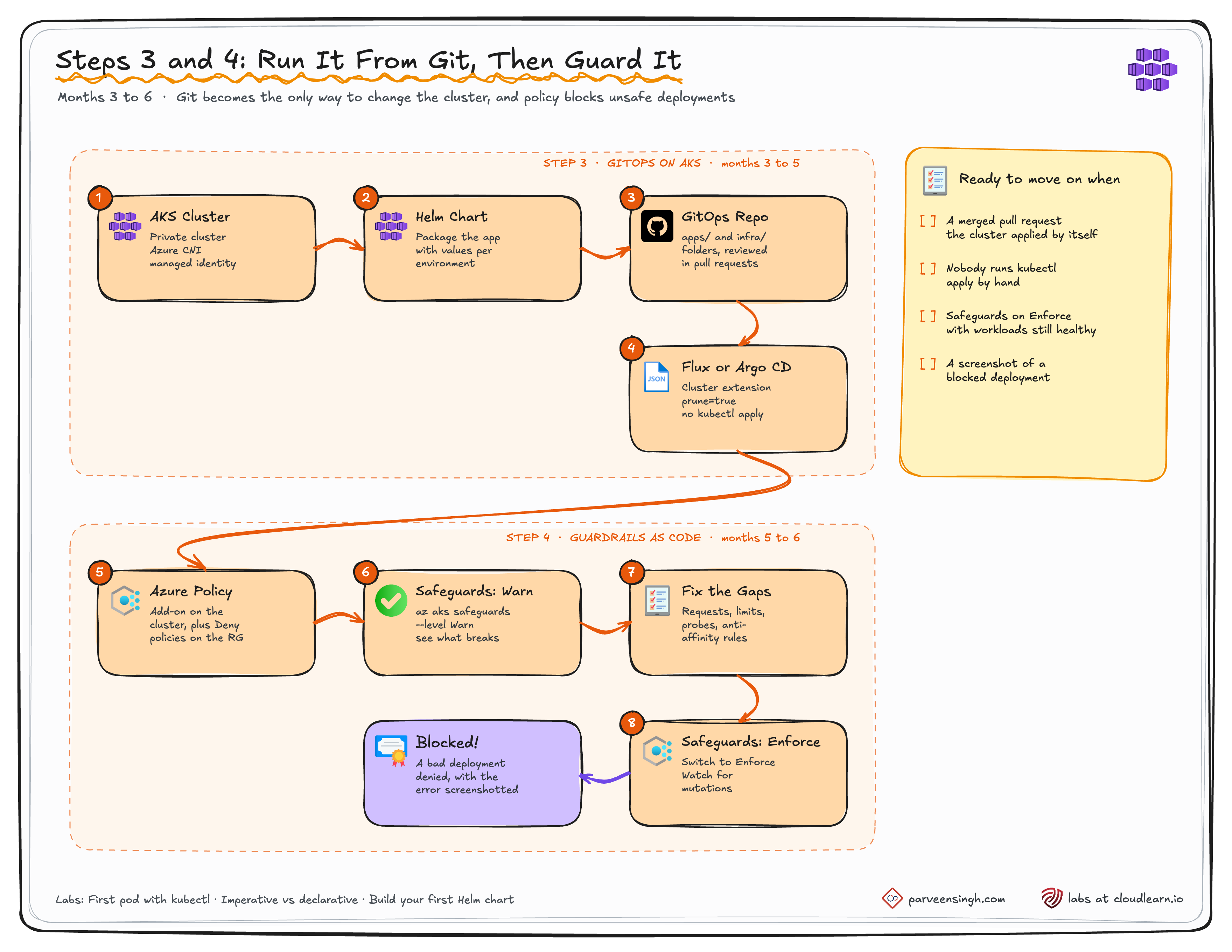
Step 3: GitOps on AKS (months 3 to 5)
Move the app onto an AKS cluster, and make Git the only way anything changes. Nobody runs kubectl apply by hand. A GitOps operator watches the repository and makes the cluster match it.
AKS supports both Flux v2 and Argo CD as cluster extensions. With Flux, one command installs the extension and points it at your repository:
az k8s-configuration flux create \
  --resource-group rg-platform-proof \
  --cluster-name aks-platform-proof \
  --cluster-type managedClusters \
  --name platform-config \
  --namespace flux-config \
  --scope cluster \
  --url https://github.com/`<your-org>`/platform-gitops \
  --branch main \
  --kustomization name=apps path=./apps prune=true
prune=true means anything you delete from Git is deleted from the cluster too, so the repository really is the source of truth. If you prefer Argo CD, Microsoft has a quickstart for the Argo CD extension.
Done looks like: you merge a pull request that changes the image tag, and the cluster updates on its own within a few minutes. If you're a network engineer, this is also where your skills show: private clusters, Azure CNI, ingress through Gateway API, and controlled egress.
Labs:
| Lab | Covers |
|---|---|
| Inspect, Create, and Debug Your First Pod with kubectl | Kubernetes basics |
| Imperative vs Declarative Pod Creation Side by Side | Why declarative config matters for GitOps |
| Build Your First Helm Chart from Scratch | Packaging the app for the GitOps repo |
Step 4: Guardrails as code (months 5 to 6)
A paved road needs guard rails. Add rules that stop unsafe deployments automatically, so the platform enforces standards instead of a reviewer.
On AKS, deployment safeguards apply a set of Kubernetes best practices through Azure Policy. Set them to Warn first, see what would break, then switch to Enforce:
# Requires the Azure Policy add-on on the cluster
az aks safeguards create \
  --resource-group rg-platform-proof \
  --name aks-platform-proof \
  --level Warn

# After you've fixed what the warnings showed
az aks safeguards update \
  --resource-group rg-platform-proof \
  --name aks-platform-proof \
  --level Enforce
Then prove it works. Microsoft's documentation shows a deployment with two replicas and no anti-affinity rule being rejected under Enforce:
Error from server (Forbidden): error when creating "deployment.yaml": admission webhook
"validation.gatekeeper.sh" denied the request: [azurepolicy-k8sazurev1antiaffinityrules-...]
Deployment with 2 replicas should have either podAntiAffinity or topologySpreadConstraints set
to avoid disruptions due to nodes crashing
Add Azure Policy at the resource group level too, for example denying public network access on storage accounts, so the guard rails cover the Azure resources your module creates as well as the cluster.
Done looks like: a screenshot of a bad deployment being blocked, and the fix that made it pass. That one screenshot says more in an interview than any slide about governance.
Gotcha:
Enforcealso mutates deployments. Containers without CPU and memory requests get defaults added. Check your pods' resource settings after you switch, so nothing gets more or less than you expected.
Steps 5 and 6: Make It Self-Service, Then Prove It Helps
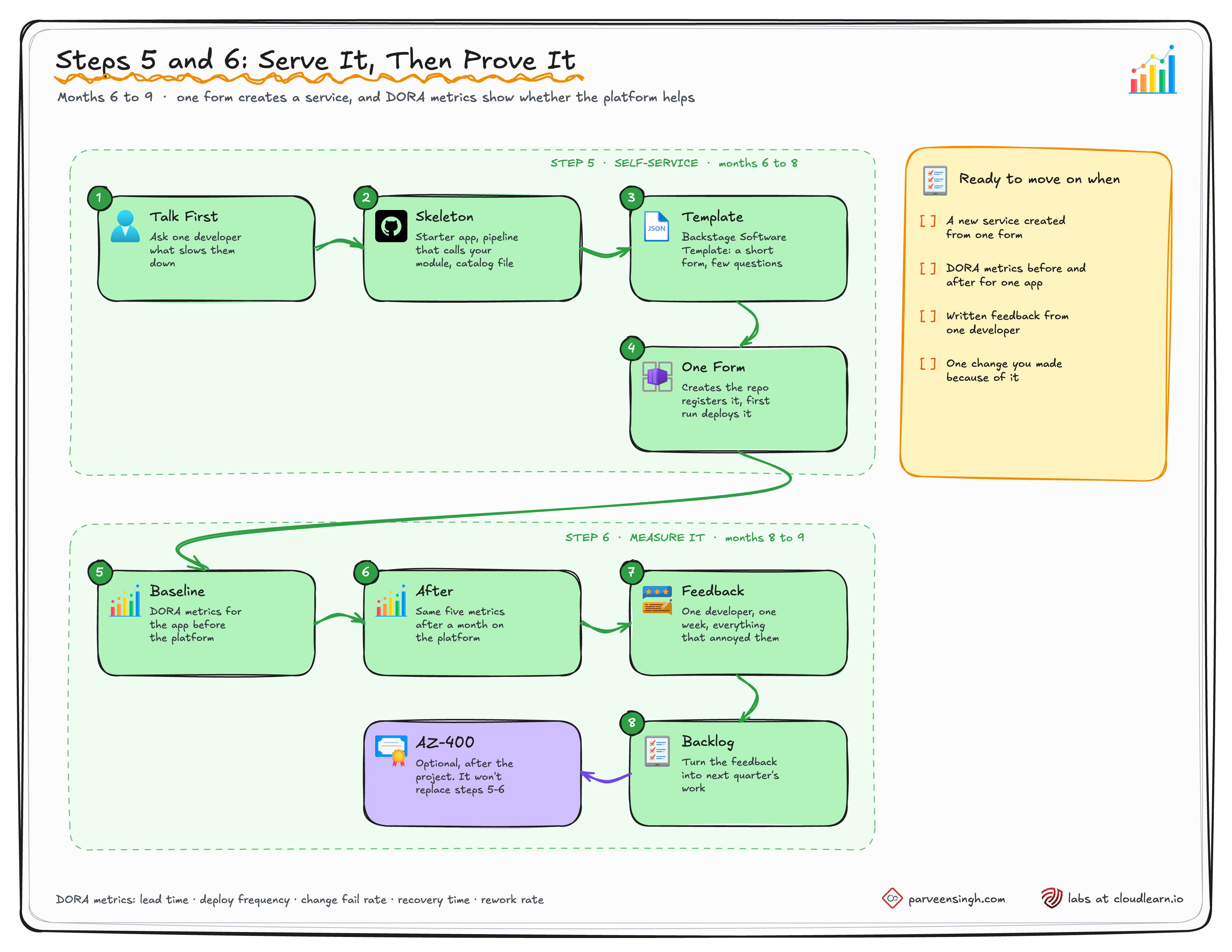
Step 5: Self-service (months 6 to 8)
Now make the whole path one form. A Backstage Software Template asks the developer a few questions, creates a repository from your starter code, and registers the new service in the catalog. The repository's first workflow run calls your Bicep module from step 2, and the GitOps setup from step 3 picks it up.
apiVersion: scaffolder.backstage.io/v1beta3
kind: Template
metadata:
  name: container-app-service
  title: New container app service
spec:
  owner: platform-team
  type: service
  parameters:
    - title: Service details
      required: [name, owner]
      properties:
        name:
          type: string
          title: Service name
        owner:
          type: string
          title: Owning team
  steps:
    - id: fetch
      name: Create the code from the starter
      action: fetch:template
      input:
        url: ./skeleton
        values:
          name: ${{ parameters.name }}
          owner: ${{ parameters.owner }}
    - id: publish
      name: Create the repository
      action: publish:github
      input:
        repoUrl: github.com?owner=`<your-org>`&repo=${{ parameters.name }}
    - id: register
      name: Add it to the catalog
      action: catalog:register
      input:
        repoContentsUrl: ${{ steps.publish.output.repoContentsUrl }}
        catalogInfoPath: /catalog-info.yaml
The skeleton folder holds the starter app, a pipeline that calls your module, and a catalog-info.yaml. Keep the form short. Every extra question is a decision you're handing back to the developer.
Done looks like: someone creates a new service from the form and has it running in a development environment without asking you anything.
Note: Before you build this step, talk to one developer and ask what slows them down. Build what they ask for, not what you'd want. That conversation is the difference between a platform and a pile of tools.
Step 6: Measure it (months 8 to 9)
This is the step that makes it platform engineering rather than DevOps with a new name. Your customers are other engineers, so you need proof that the platform helps them.
DORA's software delivery metrics are the standard way to measure it. Take them for the app before the platform, then again after:
| Metric | Before | After |
|---|---|---|
| Change lead time (commit to production) | ||
| Deployment frequency | ||
| Change fail rate | ||
| Failed deployment recovery time | ||
| Deployment rework rate |
Then ask one developer to use the platform for a week and write down everything that annoyed them. That list is your next quarter's backlog.
Done looks like: the filled-in table, the feedback, and what you changed because of it. That's the story you tell in an interview.
Pro tip: DORA warns against comparing these numbers across very different teams or turning them into targets. Measure one app over time, and use the numbers to start conversations, not to rank people.
Tools That Changed
If you watched my March video on this, I recommended two services that you should now avoid:
| Tool | Status | Use instead |
|---|---|---|
| Azure Deployment Environments | Retires on February 22, 2027. Create and deploy operations are expected to be blocked from that date. (Microsoft retirement guide) | What Microsoft's guide suggests: Bicep or ARM templates directly, Azure Verified Modules, and GitHub or Azure DevOps workflows. That's exactly what steps 1, 2 and 5 use. |
| AWS Proton | Support ended on October 7, 2026. (AWS deprecation guide) | Infrastructure as code with your own pipelines and templates. |
| Microsoft Dev Box | Still available. It has a separate retirement date of September 18, 2028, so don't build a new platform around it. | Dev containers or GitHub Codespaces for developer environments. |
Certs
You can add AZ-400, the DevOps Engineer Expert certification, if you want a cert for this work. It needs AZ-104 or AZ-204 as well (AZ-204 retired in July 2026; see the AI-200 study guide for its replacement).
Take it after the project, not instead of it. The AZ-400 study guide covers pipelines, source control and infrastructure as code, which steps 1 to 4 already give you hands-on. A cert won't replace step 5 or step 6. Nothing on the exam asks whether developers actually wanted what you built.
The Checklist
Tick these off as the project grows:
- One app deploys to Azure Container Apps from a GitHub Actions pipeline
- You've rolled back a broken release on purpose
- The infrastructure is a versioned Bicep module in a private registry
- Someone else deployed it using only your README
- The app runs on AKS and changes reach the cluster only through Git
- Deployment safeguards are on
Enforce, with a blocked deployment screenshotted - An Azure Policy denies at least one insecure Azure resource
- A Backstage template creates a new service from one form
- DORA metrics recorded before and after
- Feedback from at least one developer, and one change you made because of it
The Biggest Mistake
The biggest mistake is building the platform you'd want instead of the one developers will actually use. It's easy to spend months on the perfect GitOps setup and a beautiful portal that nobody opens. Talk to one developer before step 5, build what they ask for, and measure whether it helped.
Start With Step 1
Wherever you start, the first two steps are the ones you can practise today without a cluster. Open the Container Apps lab and deploy your first app in a real Azure environment, with no subscription of your own and nothing left running afterwards. Then work through the GitHub Actions, Bicep modules and Kubernetes labs in CloudLearn's lab catalog as you reach each step.
If security is the direction you're more interested in, the Azure Security Engineer Roadmap uses the same lane-and-project approach.